My Pantry Tracker
AppKing Software, Inc.Food & Drink
3.227.00 Reviews
- Version
- 1.8.2
- Installs
- 10.00K
- Age Rating
- Everyone
Screenshots
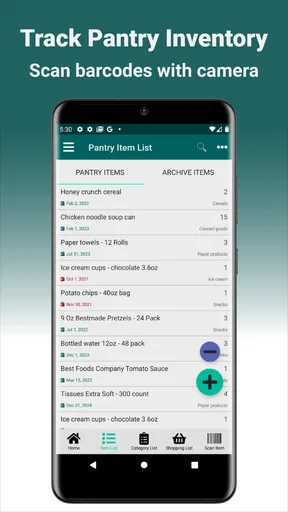
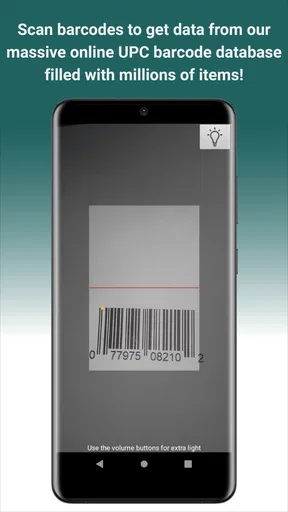
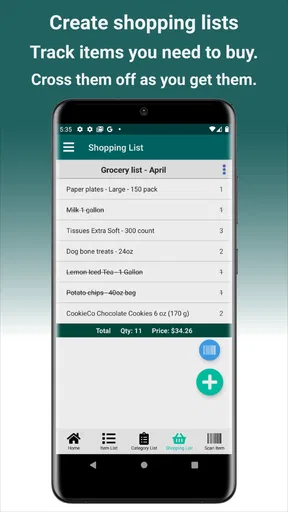
Our Review of My Pantry Tracker
 Analysis by Appyee
I’m drawn to pantry apps when they solve a very ordinary problem: buying something I already own because I can’t remember what’s tucked behind the cereal. My Pantry Tracker is built around keeping a home food inventory on a phone, with barcode scanning as its most distinctive shortcut. That idea is appealing, but the app is most useful when its routine fits the way you actually shop, store food, and check your kitchen.
Who benefits most from a phone-based pantry list
I can see this working well for someone who shops regularly, keeps a fairly stable set of staples, and wants a quick reminder before heading to the store. It can also help a household where one person does the shopping and another cooks: a shared, current inventory is more reliable than trying to remember what was bought. The key is that somebody has to maintain it. A pantry tracker can only prevent duplicate purchases when the list reflects what is really on the shelves.
For a first pass, I’d add the foods I buy repeatedly rather than trying to catalogue every cupboard in one session. Scan a few packaged staples, then enter anything that does not have a barcode in whatever way the app allows. After that, update the list as groceries come home and as items are used. This small, repeatable routine is less daunting than a full kitchen inventory, and it quickly shows whether scanning saves enough time to keep using the app.
A realistic shopping-day routine
Imagine checking the kitchen before a grocery trip. I would use the inventory to spot staples that are nearly gone, make a short list, and then check it once more at the store rather than relying on memory. When unpacking, scanning newly purchased packaged goods can help keep the record fresh. For loose produce or food transferred into containers, I would make a deliberate note instead of assuming a barcode workflow covers everything.
This is also where a useful trade-off appears: the tracker is only as accurate as the updates it receives. If several people take food from the pantry but nobody records it, the app may show something that is no longer there. In that situation, a shared paper list on the fridge can be easier because everyone can see it and add a note without needing to open an app. I’d choose the method the household will actually maintain, not the one with the most appealing setup.
Barcode scanning: useful shortcut, not a complete inventory method
Scanning is a practical way to add packaged products without typing each name, especially when you are putting away several groceries at once. It is less helpful for foods sold loose, homemade meals, leftovers, or items whose packaging has been discarded. A good approach is to treat scanning as a fast entry option, not as proof that every part of the kitchen can be captured automatically. Before depending on any entry, I’d check that the product name and quantity make sense in the inventory.
There is another small but important habit: avoid recording quantities more precisely than you can keep current. If I note every individual serving and then forget to adjust the count while cooking, the inventory becomes misleading. Broad, practical amounts—such as having a few cans left—can be more useful than a detailed count that quickly goes stale. This is especially true in a busy home where people take ingredients at different times.
Getting Started with My Pantry Tracker
First things first, let’s talk about getting started with My Pantry Tracker. Downloading and setting up the app is a breeze. Available on both Android and iOS, it’s as simple as pie to find and install. Once you’ve got it on your phone, opening it up feels like entering a digital pantry where everything is neat, organized, and ready for you to dive in.
User Interface and Navigation
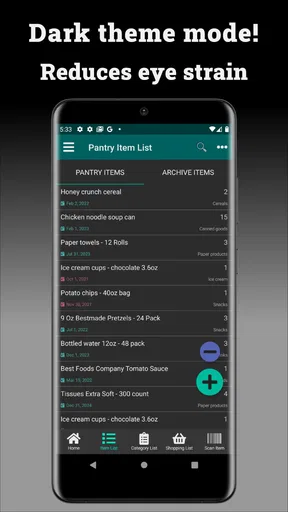
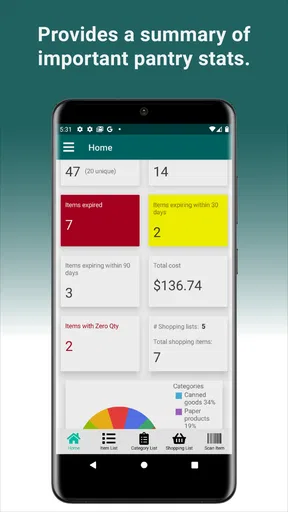
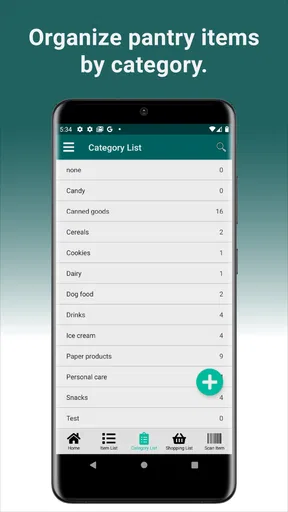
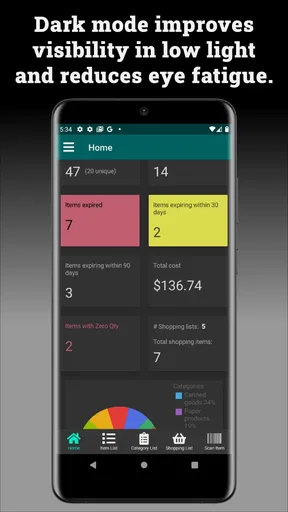
The app’s interface is clean and intuitive. You’re greeted with a dashboard that’s both visually appealing and functional. It’s designed to make sure you’re not wasting time hunting for features. Within a few taps, you can add items, categorize them, and even set reminders for when things are about to expire. The navigation is super smooth, and the learning curve is practically zero. You’ll feel like you’ve been using it for ages in no time!
Features that Stand Out
What really makes this app shine is its range of features. Let me walk you through some of the highlights that make managing your pantry a delight rather than a chore:
- Inventory Management: Say goodbye to the days of forgotten items at the back of the cupboard. With this feature, you can track what you have, how much of it you have, and when it expires.
- Shopping List Integration: The app lets you seamlessly create shopping lists based on what’s running low. Just a couple of taps, and your list is ready for your next grocery run.
- Barcode Scanning: This is a game-changer! Simply scan the barcode of your items to add them instantly to your inventory. It’s quick and accurate, saving you a ton of time.
- Recipe Suggestions: Feeling uninspired? The app suggests recipes based on the ingredients you have, helping you whip up something delicious without a last-minute dash to the store.
Keeping It All in Sync
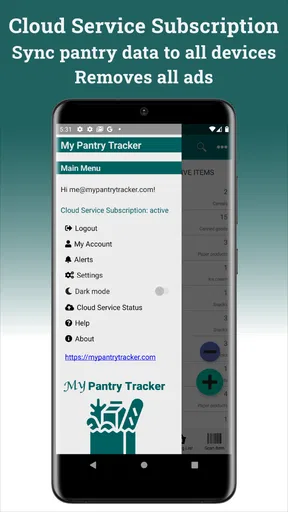
One of the niftiest features is the app’s ability to sync across devices. If you’re like me and sometimes use a tablet in the kitchen, this is a lifesaver. You can start updating your pantry on your phone and continue on your tablet without any hassle. It’s all seamlessly connected.
Personal Experience and Observations
Now, onto my personal experience. After using the app for a couple of weeks, I noticed a significant reduction in food waste. I was no longer buying duplicates or letting things expire. Plus, the recipe suggestions inspired me to get a bit more creative in the kitchen, which was a nice bonus!
The barcode scanner quickly became my favorite feature. It’s just so satisfying to scan items and have them magically appear in your inventory. It feels a bit like living in the future, and who wouldn’t want that?
Making the routine more inclusive
A pantry system also has to work during rushed, imperfect moments. I find it helpful to think about readability and navigation in practical terms: can I locate the item I need quickly, and can I understand the entry without squinting at a cluttered list? The original experience feels straightforward, but anyone who relies on larger text, strong contrast, or screen-reader support should try the actual interface on their own device before committing to a detailed inventory. A simple test is to add one item, find it again, and edit it using the settings and assistive tools you normally use.
Barcode scanning can reduce typing, which may be a welcome option for someone who finds repeated text entry tiring. It is not automatically easier for every user, though. A package may be curved, reflective, small, or hard to position, and a loose item has no barcode to scan. Keeping manual entry available as a fallback is important; I would not build a whole workflow around scanning unless it feels comfortable and dependable for the person using it.
Different kitchens, different access needs
People use pantry apps in very different settings: standing in a bright supermarket aisle, unpacking groceries at a counter, or checking supplies from a chair across the room. On a shopping trip, a short list of essentials is easier to act on than a complete catalogue, so I would keep the store-facing task focused. At home, I’d update the inventory in a calm moment rather than trying to scan items while juggling bags, children, or dinner preparation.
For users with limited dexterity, tapping through several item details may be more tiring than writing a quick note on paper. For people sensitive to visual clutter or motion, a clean screen can help, but the actual comfort depends on the device display and personal settings. Voice control or magnification may help on some phones, but I would test those tools with the app rather than assume every control works equally well with them. The useful question is not whether the app sounds accessible in theory; it is whether the everyday steps are manageable for you.
What I would check before building a large inventory
One concern with any app-centered household routine is what happens when a phone is unavailable, out of battery, or being used by someone else. A small backup note for the most frequently purchased staples can prevent the shopping trip from depending on a single device. I would also keep the inventory selective: record foods where a reminder genuinely changes a decision, rather than spending time tracking every spice jar or condiment.
There is a difference between knowing that an ingredient is somewhere in the kitchen and knowing it is usable. Expiration reminders can help draw attention to dates, but they do not replace checking packaging, storage conditions, or the food itself. I’d treat reminders as prompts to inspect an item, not as a guarantee of freshness. This distinction matters especially when several packages of the same food have different dates.
My Pantry Tracker is a free food-and-drink app from AppKing Software, Inc., with optional in-app purchases priced from $0.99 to $9.99 per item. It has a 3.2 average from 43 ratings, with 24 written reviews and over 10,000 installs. It is rated for everyone; version 1.7.1 supports Android 5.0 and later, and the app was released on August 11, 2021. Those figures suggest a modest audience and mixed user sentiment, so I would try the basic routine before paying for anything. The right test is whether scanning and checking the inventory actually saves you effort week after week.
When another method is the better fit
If you want a detailed household database with dependable collaboration, a conventional shared notes or list app may suit you better, especially if everyone already uses it. A paper list can be the least fussy choice for a small kitchen or for anyone who does not want another phone task. At the other end, a dedicated food-planning tool may be preferable if meal planning is the main goal. My Pantry Tracker’s appeal is narrower and clearer: it puts pantry tracking and barcode-based entry at the center, rather than asking a general notes app to do that job.
I would skip it if you rarely buy packaged foods, dislike maintaining digital lists, or need a highly predictable accessibility experience without testing first. It is a better match for someone willing to spend a little time keeping common staples current and who finds a phone-based inventory easier than memory or scattered notes. Families can make it more useful by agreeing on one simple rule, such as updating an item when the last package is opened, rather than expecting everyone to record every serving.
Final Thoughts
So, is My Pantry Tracker worth downloading? Absolutely! It’s a fantastic tool for anyone looking to streamline their pantry management. The app is user-friendly, packed with handy features, and genuinely makes life easier. Whether you’re a busy parent, a culinary enthusiast, or someone just trying to keep track of your groceries, this app has something for you.
All in all, it transforms the mundane task of tracking your pantry into something almost enjoyable. And let’s be honest, who doesn’t want a little more organization in their life? If you’re ready to take control of your kitchen chaos, give it a try. I’m pretty sure you’ll love it as much as I do!
Verdict
Strengths of My Pantry Tracker
- User-friendly interface for easy navigation.
- Barcode scanner speeds up item entry.
- Customizable alerts for expiry dates.
- Supports multiple lists for better organization.
- Offline access to pantry inventory.
Limitations of My Pantry Tracker
- Limited integration with other apps.
- No cloud sync for cross-device access.
- Occasional glitches in barcode scanning.
- Lacks detailed nutritional information.
- Ads can be intrusive in the free version.
Similar Picks in This Category
View All
Rappi: Food Delivery, Grocery
Rappi, Inc - Delivery3.5

McDonald’s: Cupons e Delivery
Arcos Dorados4.3

Swiggy: Food Instamart Dineout
Swiggy4.7

Blinkit: Groceries & more
Blinkit4.8

foodpanda: food & groceries
Foodpanda GmbH a subsidiary of Delivery Hero SE4.0

Zomato: Food Delivery & Dining
Zomato4.7
Frequently Asked Questions
What features does My Pantry Tracker offer?
My Pantry Tracker offers a comprehensive set of features, including inventory management, expiration date reminders, and meal planning suggestions. Users can easily add items by scanning barcodes or manually entering them. The app tracks quantities and notifies users when items are running low, helping you stay organized and reduce food waste.
Is My Pantry Tracker available on both Android and iOS?
Yes, My Pantry Tracker is available for download on both Android and iOS platforms. You can find it on the Google Play Store for Android devices and the Apple App Store for iOS devices. It offers a consistent user experience across both platforms, making it accessible to a wide audience.
Does My Pantry Tracker require an internet connection to function?
My Pantry Tracker primarily functions offline, allowing you to manage your pantry without an internet connection. However, certain features, such as cloud syncing and barcode scanning, may require internet access to ensure up-to-date information and seamless user experience across multiple devices.
Can My Pantry Tracker help with meal planning?
Absolutely! My Pantry Tracker includes a meal planning feature that suggests recipes based on the items you have in your pantry. This feature helps you make the most of your available ingredients and avoid unnecessary grocery trips, saving you time and reducing food waste effectively.
Is there a cost associated with using My Pantry Tracker?
My Pantry Tracker offers a free version with basic features suitable for most users. However, there is also a premium version available, which includes additional features like advanced reporting, unlimited item tracking, and ad-free usage. This allows users to choose the best option based on their needs.
